Monday, June 16, 2014

Golang: Serving static content using Gorilla

Using the identical directive from ServeMux  "http.Handle("/static/", http.FileServer(http.Dir("./static/")))" for Gorilla to serve static files wasn't working - the directory listing works but clicking on any of the files listed would produce a 404.

There seems to be two ways to configure the mux to serve static content in Gorilla Mux(highlighted in blue)

package main

import (
    "github.com/gorilla/mux"
    "net/http"
)

func main() {
    r := mux.NewRouter()
    r.HandleFunc("/", HomeHandler)

    //This won't work
    //http.Handle("/static/", http.FileServer(http.Dir("./static/")))

    //These will work
    //first alternative
    http.Handle("/static/", http.StripPrefix("/static/", http.FileServer(http.Dir("static"))))


    //second alternative
    
    r.PathPrefix("/images/").Handler(http.StripPrefix("/images/",
            http.FileServer(http.Dir("images/"))))
    
    http.Handle("/", r)

    http.ListenAndServe(":3000", nil)
}

func HomeHandler(rw http.ResponseWriter, req *http.Request) {

    rw.Write([]byte("You are at /"))
}


Thursday, June 12, 2014

Misplaced semiconlon and debugging fun in Javascript

This is frustrating and funny at the same time. I've been stuck at this simple condition statement wondering my nulled variable didn't check out true ... for about 5 minutes.

Turns out I totally missed ';' at the end of the if statement, which ended the condition and executed the next block of code anyway.


listview_tasks=null;


...


if(!listview_tasks);
{
    Ti.API.info("why am I here?");

}

Argh.

I blame the tiny font I'm using on my IDE. 

Time for a break me thinks.


Saturday, May 24, 2014

WinAuth and Wine on Ubuntu 14.04

Didn't see much information on WinAuth working via wine so I was surprised to find out how simple it was to get it working in Ubuntu using PlayOnLinux (4.2.2)

These is my setup:

Set up a new drive by clicking configure.


Select New.


Select 32 bits Windows installation.


I'm using the Wine 1.7.15 (32bits).


Call it "Winauth".


Once the step is done, go back to the configuration window and click on "Install Component", select dotnet40 and install.


Once done, open a terminal and copy your Winauth.exe and if you have winauth.xml from your windows directory, copy that too:


$ cp WinAuth.exe  ~/.PlayOnLinux/wineprefix/Winauth/drive_c
$ cp winauth.xml ~/.PlayOnLinux/wineprefix/Winauth/drive_c


Go back to the configuration window, making sure that Winauth drive is selected, click "Make a new shortcut from this virtual drive".


Click Browse.


You'll be able to find Winauth.exe in the window that shows up. Click Open and once done, exit the configuration window. You should have a shortcut on the desktop as well..


Here it is :)


Friday, May 23, 2014

PlayOnLinux and Diablo 3 ROS: Get pass that "Retrieving Hero List" bug!

PlayOnLinux is a welcomed tool to make Wine configuration fairly painless. The default D3 installation option works, however playing the game with the default options won't work. The game is rendered very slowly and has choppy audio and gets stuck on "Retrieving Hero List"

This is how I fixed it( Ubuntu 14.04 and fglrx drivers):

Highlight "Diablo III", Click on "Configure" on PlayOnLinux toolbar and add "-opengl" in Arguments.


The frame rate should be a lot better now but you will be stuck at "Retrieving Hero List..."

On Ubuntu desktop, selected the Diablo III shortcut placed by PlayOnLinux and edit it to include "setarch i386 -3 " prefix in Command textbox:


The game should work  smoothly now.


Wednesday, May 21, 2014

Steam, Linux and Segmentation fault

My steam deb installation on Kubuntu 14.04 failed while it was trying to start. When I ran the program from the control panel , it showed that it crashed out with a segmentation fault.

Turns out that the issue was attributed to the proprietary drivers I was using(  in this case AMD's fglrx). Setting the drivers to the  Xorg's drivers and re-run steam worked.

Tuesday, May 13, 2014

Gigabyte H87 D3H : Not stable or bootable sometimes, but fixed

I got a Gigabyte H87-D3H and a Haswell processor. What adventures I had with it.


Symptoms: With the old PC10600 16gb RAM The box just won't boot sometimes, or would start displaying pixel corruption in the BIOS screenor hang randomly.

When you get a board fresh from the store together with a new CPU, you would expect the board to boot up just nice right? Apparently not in this case:

The box booted without display. LCD monitor just went to sleep upon finding no signal.

The tedious troubleshooting proceeded, swapping out card to run the native HD4400 display, and disconnecting hard drive and RAM.

The configuration that finally worked for me was when I had one or two sticks of RAM in the board(I had 4X4GB sticks). System ran stable for 2 weeks.

I had some time today since it is a public holiday, so I swapped  2X8Gb cosair kit ram from the Win8 box...and the box booted without display. Only one stick at any slot will work. Great.

Started poking around the BIOS to see if there's any RAM settings that wasn't out of the box when I noticed that the BIOS was 2 revisions and the new one  "Support New 4th Generation Intel Core Processors"

Patched it and now it seems to be perfectly happy to take the all RAM sticks. Hello Xubuntu( and all the Wine games).

Troubleshooting PCs are only fun when all you have is time.


Saturday, May 10, 2014

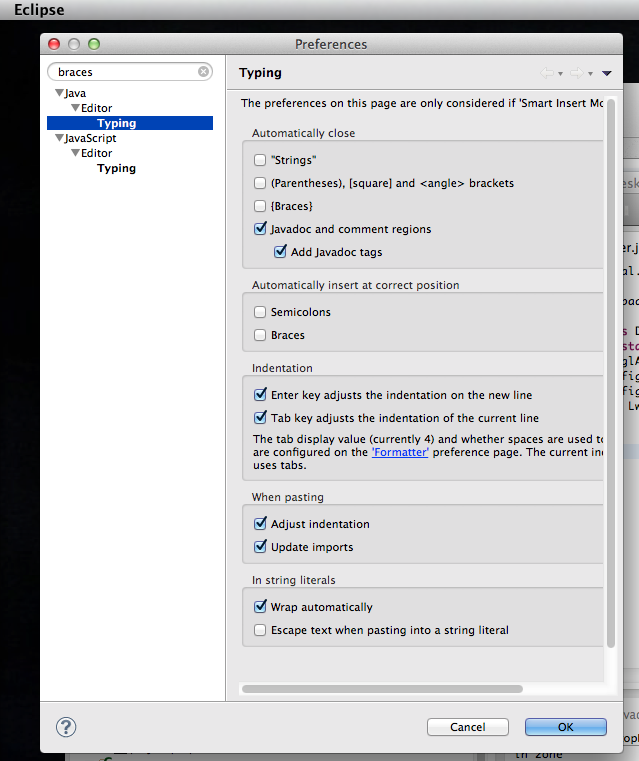
Disable autocompletion of braces, strings and parentheses in Eclipse


Autocompletion of braces and quotes may be productivity gain for  lots of people, that's why Eclipse has that settings on by default right? I found that this feature is breaks my coding flow.. and thankfully there is a way to turn it off easily.

Access Preferences (Alt+,/Eclipse->Preferences in OSX or Window->Preferences in others
Type braces into the text search and disable in Java->Editor->Typing or Javascript->Editor->Typing depending on what source code you're working on.

Uncheck the items under "Automatically close"